Since Samba 4 releases, its function is as a compatible Active Directory Domain Controller that come with Kerberos logon and authentication, LDAP directory, dynamic DNS and remote procedure call and so on.
(# 1)The following section will introduce How to install and configure Samba 4 as Active Directory Domain Controller on CentOS 6.x x64 version.
Prerequisite
To login the system by
root account and update the yum repositories and packages by using the
yum update command.

If the process complete, please reboot for applying the update.
To disable SELinux for reducing complications issue

To change FQDN name in the
/etc/sysconfig/network file that depend on our requirement

To install the related packages with dependencies for installing and building Samba 4 tarball by using the
yum -y install gcc make wget python-devel gnutls-devel openssl-devel libacl-devel krb5-server krb5-libs krb5-workstation bind bind-libs bind-utils command (# 2)
To query the rpm database to find any older samba package by using the
rpm –qa | grep samba or
yum list installed | grep samba command

If the old samba package is found
(# 3), please remove it by using the
yum remove samba-winbind-client samba-winbind samba-common samba command
Download, compile & install Samba 4
Option (1):To download manually the latest Samba tarball from the
Samba Website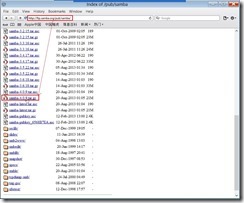
To unpack and decompress this download tarball by using the command
tar –zxvf smaba-x.x.x.tar.gz

Option (2): To download the last Samba via the
git protocol by using the
git clone git://git.samba.org/samba.git samba-master command

or the
git clone http://gitweb.samba.org/samba.git samba-master command
(# 4)
So does the
samba-master directory will be created.
After finish any option, we have to switch to the extracted directory next to configure it by executing the command
./configure - -enable-selftest

To build Samba by using the command
make

To install Samba by using the command
make install

So does that the Samba will be installed to the
/usr/local/samba directory
(# 5)
Provision Samba 4.0.x
To provision a new domain by executing the command
/usr/local/samba/bin/samba-tool domain provision and change the default setting if necessary (# 6)
 Configure Samba 4 with Bind as DNS backend
To setup Bind 9 folder permission as follows:
 Edit Bind9 configuration
To append
include "/usr/local/samba/private/named.conf"; at the end of the file and add tkey-gssapi-keytab "/usr/local/samba/private/dns.keytab"; to the options by editing
/etc/named.conf Configure rndc
To generate
rndc.key in the
/etc directory by executing the
rndc-confgen –a –r /dev/urandom command it this key never appear.
To generate rndc.conf in the /etc directory by running the
rndc-confgen > /etc/rndc.conf command

To correct
rndc.key secret value is the same as one in the
/etc/rndc.conf file

And by editing the
/etc/named.conf file, we need to add some value that the content is the same as one in the
/etc/rndc.conf file
(# 7)
If the above process finish, we will rename or delete
rndc.conf file to avoid the confusion.
Add Reverse Zone Record
Due to this is the fist DNS Server that is built with Samba Server, we have to add some record as Reverse Zone for configuring Primary(Master) Name Server by editing
/etc/named.conf file
 Create Zone file
Based on our mention in the additional record of the
/etc/named.conf file, we will create rev
.dwlab.mooo.com file in the
/var/named directory and add the entries for reverse zone.
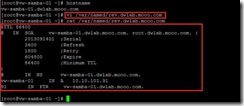
Also create rev
.localhost file in the
/var/named directory and add the entries for reverse zone.
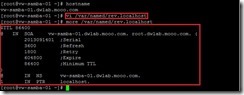
Start Bind Service
To start named service by executing the
service named start or
/etc/init.d/named start command manually


or initialize named service at boot time by using
chkconfig – levels 235 named on command

Verify DNS function
To set the samba will use the own internal DNS firstly by editing the
/etc/sysconfig/network-script/ifcfg-eth0 file
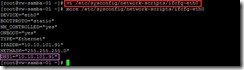
To confirm whether named daemon is started by using the
service named status command

To verify whether the forward and reverse lookup is right by executing
nslookup command
 Install and Configure NTP
Due to the time synchronization between DC and Client is very important, we need to enable NTP daemon in each Samba 4 as AD role.
How to do it? please refer to this article
NTP --- Install & Configure NTP daemon on Minimal CentOS 6.x to realize it in detail
Configure Kerberos
Due to the kerberos in CentOS 6.3 or later is handled by the
/etc/krb5.conf file,we will backup this original file and replace it with the
/usr/local/samba/setup/krb5.conf file

To edit the
/etc/krb5.conf file and replace ${REALM} with the value you chose for the '--realm' parameter of the provision command earlier
 Configure & Start Samba 4
Start Samba 4 manually
Configure & Start Samba 4
Start Samba 4 manually
To start manually the samba daemon by using the
/usr/local/samba/sbin/samba command

or create and configure samba init script by using the
vi /etc/init.d/samba4 command with the following contents.


To set this init script permission to 755 by using the
chmod 755 /etc/init.d/samba4 command

To start manually the samba daemon by using the
/etc/init.d/samba4 start command
 Start Samba 4 automatically
To start it at boot by appending the
/usr/local/samba/sbin/samba command to the
/etc/rc.d/rc.local file
To initialize samba daemon start at boot by using the
chkconfig - - levels 235 samba4 on command if we ever create a samba init script.
 Configure iptables rule
To realize which listening port require for AD/Samba4 by using the
netstat –lntup | grep –e samba –e smbd command

or for DNS by using the
netstat –lntup | grep –e named command
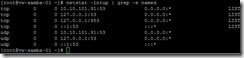
or for NTP by using the
netstat –lntup | grep –e ntpd command
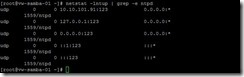
So do we can summarize what port number needs as follows:
53, TCP & UDP (DNS)
88, TCP & UDP (Kerberos authentication)
123, TCP & UDP (NTP)
135, TCP (MS RPC)
137, UDP (NetBIOS name service)
138, UDP (NetBIOS datagram service)
139, TCP (NetBIOS session service)
389, TCP & UDP (LDAP)
445, TCP (MS-DS AD/SMB CIFS)
464, TCP & UDP (Kerberos change/set password)
636, TCP (LDAP SSL)
3268, TCP (LDAP Global Catalog)
3269, TCP (LDAP Global Catalog SSL)
To add the above port number to the iptables rule by executing the following command

or directly add iptables rules to the
/etc/sysconfig/iptables file
Don’t forget to execute the
service iptables save and
service iptables restart command for applying the new rule right now.
(# 8)
Verify Samba 4 AD DC
Test Samba
To confirm the samba version by using the
/usr/local/samba/sbin/samba –V command

To confirm the samba-client version by using the
/usr/local/samba/bin/smbclient - - version command

To confirm the samba share function by using the
/usr/local/samba/bin/smbclient -L localhost -U% command
 Test DNS
To confirm the DNS record for ldap, kerberos and samba by using the following command.
 Test Kerberos
To confirm whether kerberos authentication is working by using the
kinit administrator@DWLAB.MOOO.COM command
(# 9)
If the output is as the above message, we can confirm whether can receive a ticket by using the
klist command

Until now, we have already finished building the Samba 4 AD DC!
Reference :
(# 1) If we has interesting to realize what the new changes in Samba 4, please refer to this
Samba WiKi
(# 2) Which the development library and program need to be installed? Maybe we can refer to this web site
Samba 4/OS Requirements to find the solution.
(# 3) If the samba ever is installed by yum, we will see what packages have already been existed now by using the
rpm –qa | grep samba or
yum list installed | grep samba command
 (# 4)
(# 4) In general, the
git protocol is the preferred choice because the download data is compressed.
(# 5) When we need to install the necessary missing packages for fix error that run
configure, make, make install command,please remember to do
make clean command before running
make again
(# 6) If we need to re-run the provision command, we have to remove the
/usr/local/samba/etc/smb.conf file ,and Samba database by using the command
rm –rf /usr/local/samba/private/*
(# 7) If no add these values, maybe we will get the error message as follows when run the
service named status command
 (# 8)
(# 8) What is the different rule in the
/etc/sysconfig/iptables file after applying rule?
AS-IS

TO-BE

 (# 9)
(# 9) please note the domain realm have to be uppercase letters as DWLAB.MOOO.COM. If key in lowercase letters as dwlab.moo.com, we will get the error message as follows:

Another, the administrator password is generated in the provision process. If we forget the password, we can reset it by using the
/usr/local/samba/bin/samba-tool user setpassword administrator command

 Whether exist any repository with the Samba up to date?
 In the account form, please write down some information as username, password … on asterisk field.
 After clicking Sign up button, a message will tell us that a confirmation link will send to the registered email address.
 When we get this mail from the Sernet registration portal, please click the link to confirm the account email.
 It will log in the SerNet Website and tell us that we can download files if log on by using username/password in the future. Until now, we have already finished the registered procedure.
 Due to we will use the yum command to download the repository file on CentOS 6, please click sernet-samba-4.0.repo(yum) link to realize what is the repository template file.
 In the Confirm page, please click OK button if we log in this Website with the right username.
 So does that we will see what the content of the repository template is.
 In the moment, we will switch to the /etc/yum.repos.d repository path, create a repository file as serner-samba.repo, and add some words as the template content excluding USERNAME:ACCESSKEY is replaced with the personal username:accesskey.
 Or import the key manually as follows:
 To export the SerNet’s RPM public key into a file that can display it on a Web page or paste it in email by using the gpg --export --armor F4428B1A > /etc/pki/rpm-gpg/sernet-pubkey command
 To import the SerNet’s RPM public key by using the rpm --import /etc/pki/rpm-gpg/sernet-pubkey command


 If the Samba will pay a Domain Controller role, we have to install the related package by using the yum install –enablerepo=sernet-samba sernet-samba-ad command
 Now we have already installed the last Samba version then.


