網頁

2011年9月4日 星期日

Enable Firewall Service between windows 2003 AD and 2008 R2 AD

In general, we often install AD without firewall function on our corporation or lab environment. So do that it will be easy to build AD. Although we know it is not safety or strict on system setting, we always disable window firewall service for avoiding the redundant effort in any troubleshooting. As you know,it will have a little chance for Cracker if there is existing any open port on O.S. If there is extra security hole on O.S., maybe it will be good channel pass through this and let system or application function crash suddenly.

As the previous article "Samba 3 join Windows AD", I also do the same behavior for avoiding firewall limitation. So do that I will focus on the relationship between Samba and AD and it will be easy to troubleshoot for us. But I know, it is not exact action because I assume there is no existing any security on system.

Time is up to enable firewall function on Windows platform!
How to do it?
That is the AD function still be normal after enable firewall service between Windows 2003 AD and Windows 2008 R2 AD.

At first, the AD replication need to be concerned. The second is FRS function. The last is RPC for net logon or join Domain. Please follow the next process to realize how to change setting on AD!

Ø  Configure all Domain Controllers TCP port number for AD Replication to use a specific port
1.      Add the following registry value on HKEY_LOCAL_MACHINE\SYSTEM\CurrentControlSet\Services\NTDS\Parameters
§  If Windows 2003 Server
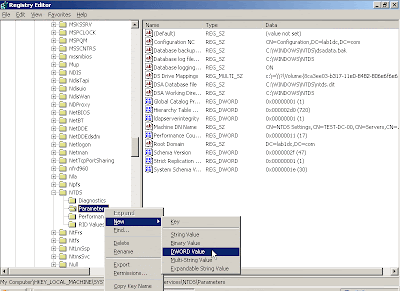
§  If Windows 2008 R2 Server
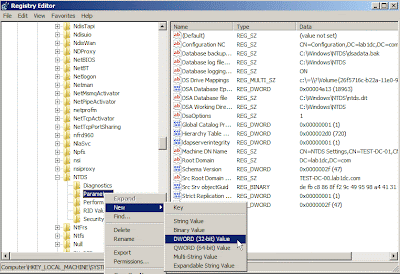
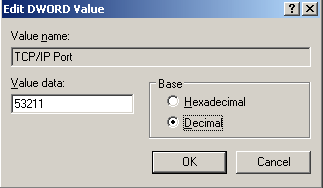
§  Set “TCP/IP Port” on Value name and “53211” (Decimal) on Value data
2.      Add the following setting on firewall
§  If Windows 2003 Server

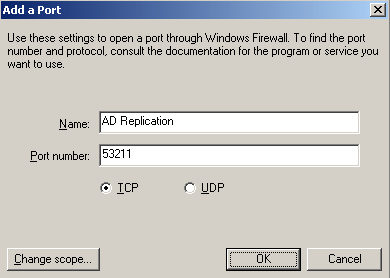
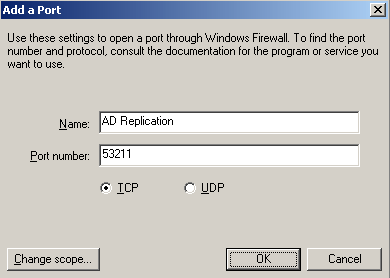
Write down a firewall rule Name and “53211” Port number, next to click “OK” button
§  If Windows 2008 R2 Server
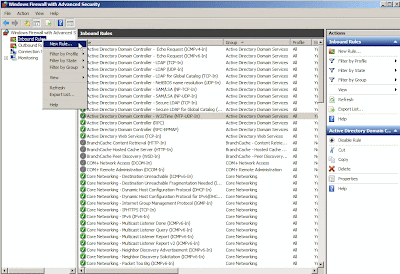
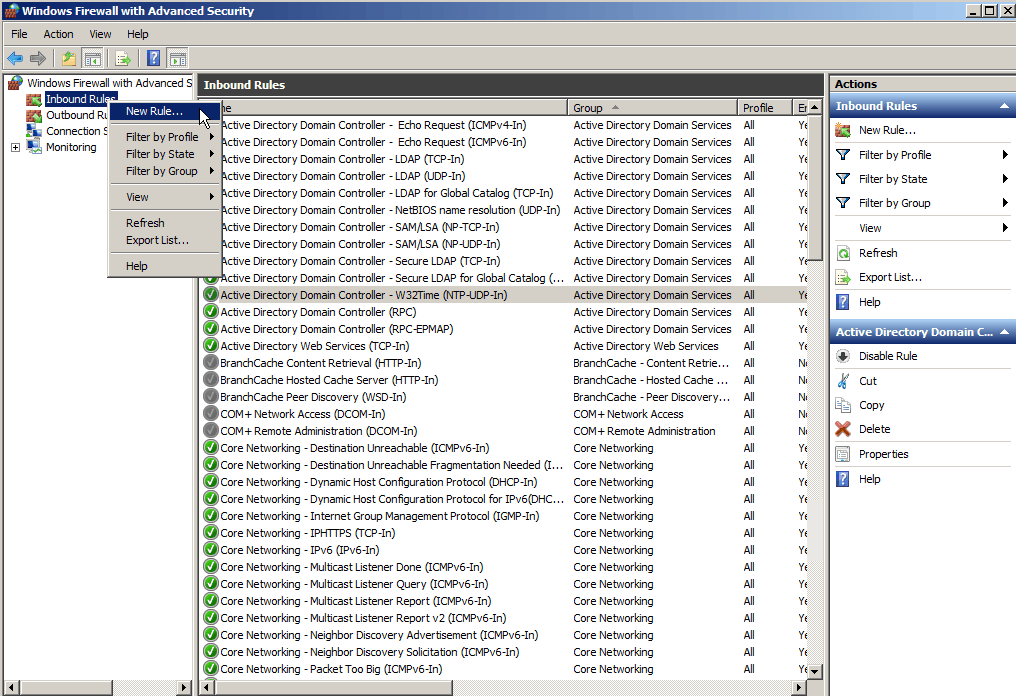
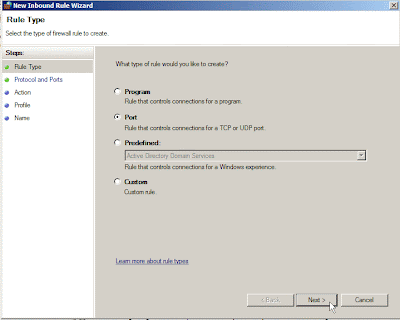
Select “Port” option next to click “Next > ”  button
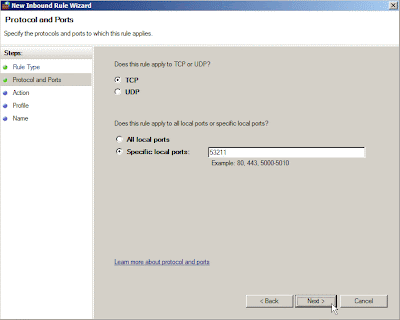
Set “53211” value on Special local ports field next to click “Next >”  button
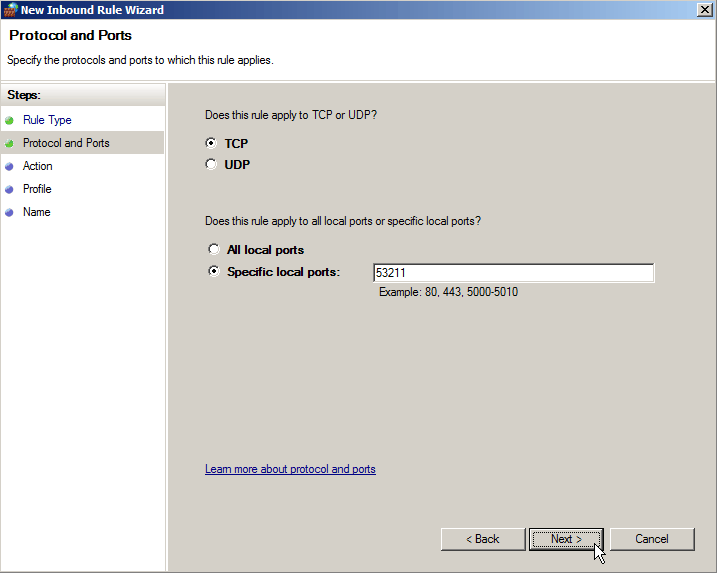
Click “Next > “ button
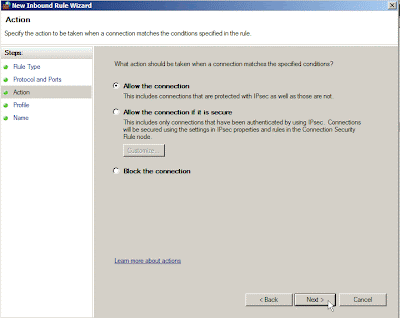
Click “Next > ” button
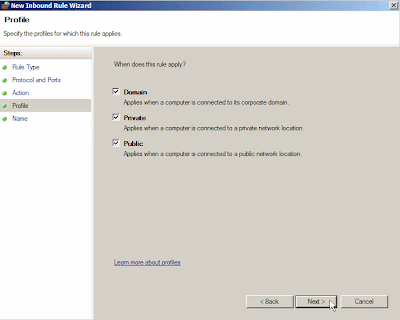
Write down a firewall rule Name and click “Finish” button


Ø  Configure all Domain Controllers TCP port number for FRS to use a specific port
1.       Add the following registry value on HKEY_LOCAL_MACHINE\SYSTEM\CurrentControlSet\Services\NtFrs\Parameters
§  Windows 2003 Server

§  Windows 2008 R2 Server

§  Set “RPC TCP/IP Port Assignment” on Value name and “53212” (Decimal) on Value data


2.       Add the following setting on firewall
§  If Windows 2003 Server

Write down a firewall rule Name “File Replication Service” and “53212” Port number, next to click “OK” button


§  If Windows 2008 R2 Server

Select “Port” option next to click “Next > ”  button

Set “53212” value on Special local ports field next to click “Next >”  button

Click “Next > “ button

Click “Next > ” button

Write down a firewall rule Name and click “Finish” button


Ø  Configure all Domain Controllers TCP port number for RPC to use a specific port
1.      Add the following registry Key “Internet” under
HKEY_LOCAL_MACHINE\SYSTEM\CurrentControlSet\Services\NTDS\Parameters
§  If Windows 2003 Server

§  If Windows 2008 R2 Server

2.      Add the following registry value on
HKEY_LOCAL_MACHINE\Software\Microsoft\Rpc\Internet
§  Under the Internet key, add the values "Ports" (MULTI_SZ)

§  Set “Ports” on Value name and “5000-5100” on Value data

§  Under the Internet key, add the values "PortsInternetAvailable" (REG_SZ) and "UseInternetPorts" (REG_SZ)

§  Set “PortsInternetAvailable” on Value name and “Y” on Value data
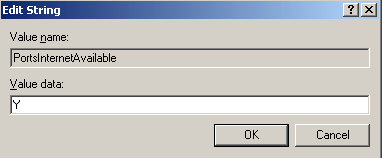
§  Set “UseInternetPorts” on Value name and “Y” on Value data

3.      Add the following setting on firewall
§  If Windows 2003 Server

Create multiple ports from the command prompt by the following scripts

: Delete multiple ports by the following scripts

So do that you will see the ports is created for RPC range
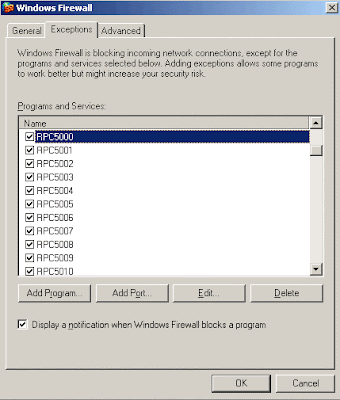
§  If Windows 2008 R2 Server
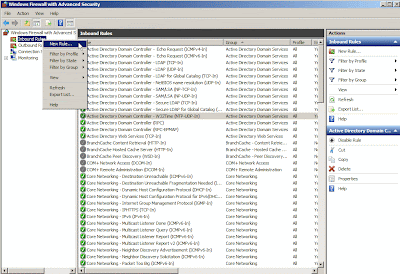
Select “Port” option next to click “Next > ”  button
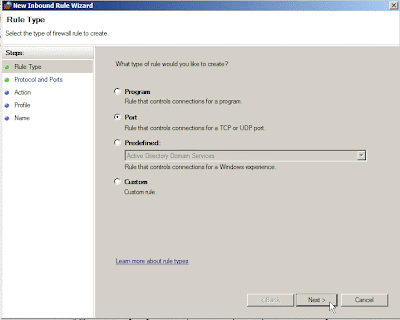
Set “5000-5100” value on Special local ports field next to click “Next >”  button
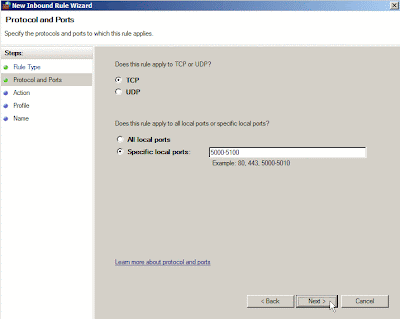
Click “Next > “ button
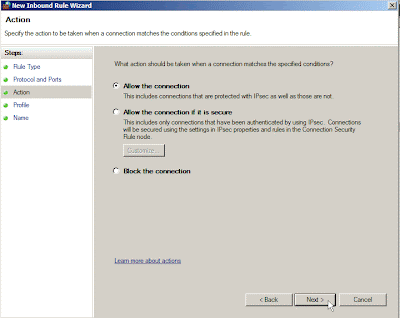
Click “Next > ” button
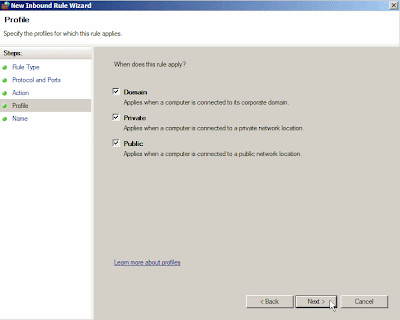
Write down a firewall rule Name and click “Finish” button

When the previous setting has already been finished and firewall service is enabled, the system need to be rebooted next to verify whether AD Replication, FRS and RPC for net logon also are normal. So you can run Dcdiag.exe on prompt command to confirm the function is not any problem.

If there is any error message on report, please double-check whether the setting is wrong or forget to change any parameter. Just only one solution ---- try and error by yourself!
Ø  Verify the state of  all Domain Controllers by Domain Controller Diagnostic tool (Dcdiag)

Open a text file to confirm whether exist “passed test” words if it success

2011年8月27日 星期六

"新"小三

最近我家的小三已經變成小四,轉眼間已經又過了一年,真快!畢竟女兒已經從小六畢業,今年也要讀國一了.  那誰來替補小三的位置呢? 正當詫異的時候,沒多久家裡又多了一個新成員---Mazda 2.

真不知道當時是發了慈悲,還是中了大獎,家境小康的我們, 原本是打算添購一台中古車for老婆接送小孩用的. 畢竟身上沒有那們多現金,再加上目前景氣也不是很好,身上又背了沉重的房貸,故想要買中古車即可. 最後會打消念頭,是因為網路上存在買中古車的糾紛,而自己又是怕麻煩的人,且本身對於車子並不瞭解,又沒有認識的朋友可以介紹,故才會轉向購買新車.

只是依照原本預算,只夠付熊貓車或太子的大陸車,畢竟這些都很便宜. 但考量車子的安全性,為了家裡老小的生命著想,在這些"便宜的"大陸車尚未讓國人心態能完全接受,及市場的占有率提高之下,暫時還是避開這些車種吧.

那既然還有其他小型國產車,最後為何選定Mazda 2?
可能是受了Sales的價格與優惠的誘惑(0 利率),或是當下看車時還在農曆七月間,才一股腦兒看車當天就決定訂車,不知道決策是否正確,想想還真是有點衝動,畢竟一台車的價錢是不便宜的.

為什們會動了買車的念頭?
想想老婆嬌小的身材,騎著50 CC機車帶著家裡兩位小朋友上下學,而小朋友也隨著歲月一點一滴的長高與長壯,且女兒的身高也已經超過我老婆了,有時衣服也可能共穿.若再加上我兒子,可想而知,目前騎車接送確實滿吃力的. 難怪上次在家裡停車入口前,因機車勾到書包而摔車,造成小孩與大人都受到皮肉傷,這就是為何會想要買車的原因!

為了這部車,特地請岳父大人挑選良時吉辰的日子,近期已由老婆與我順利將他帶回家裡,正式成家中的一分子. 只是趁著假日期間,請老婆大人開車道路練習. 或許是太久沒開, 還是我坐在旁邊講東講西而形成壓力,總之,從家裡開車到學校的這段路上,一路上讓人提心吊膽,且後車的人多少被這台龜速行駛惹毛,甚至不耐煩超車及按喇叭. 我想: 若不是看到女性駕駛,可能早就下車破口大罵,甚至被海扁都有可能! 真是有點擔心! 真不知道當時是哪來的勇氣,鼓勵老婆開車上下班!

開著開著,天空忽然飄起細雨了,我想應該是颱風快來的時候,沒想到小美容沒多久,可能又會弄髒,到時候又要自助洗車了. 想到買車前老婆就告知,以後洗車或維修的事項,就交由我來處理了.想到日後要為小三洗身,不覺得很感慨,真是"沒事找事做"--- 真牙給(台語)!!!

果然小三真麻煩,日後還是少碰小三較好!!!

2011年8月15日 星期一

Change hostname,IP Address and certificate on ESX Service Console

For saving my disk space, I prepare for doing Cloned-Link virtual disk on ESX Server. By following the previous process from my blogger article (http://daviwa.blogspot.com/2011/06/to-create-linked-clone-vmdk-by-vdkexe.html), it did can boot into ESX Console Mode and I can connect with it by VMware vShpere Client.

But I find a question: If I duplicate ESX Server, I need to change some information as hostname, IP Address and so on. Of course, the certificate also need to be renewed after change the hostname.

Although I know how to change hostname and IP address on Linux platform as CentOS or Redhat, I don't know what procedure is right or how to do it?

At first, please using the editor as "vi /etc/vmware/esx.conf" to correct the parent disk parameter.
the original parameter

the cloned-link parameter

Next to correct hostname by "vi /etc/hosts"
the original parameter

the cloned-link parameter

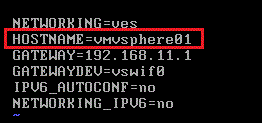
And correct HOSTNAME or GAEWAY by  "vi /etc/sysconfig/network"
the original parameter

the cloned-link parameter

Finally,please change ESX service console interface by the following command.
So do that you will see the service console is changed now.

After finishing the above steps, please reboot it and the ESX service console will be changed to the new Server or IP.

Please log on the console again by root for regenerating the new certificate.
After backing the original certificate by the following command

And regenerate the new certificate by this command --- "service mgmt-vmware restart",you will see the new certificate is created on screen.

When you reconnect with ESX by VMware vShpere Client and click "view certificate" button

you will see this certificate issue to ESX02.dw.com now.

2011年8月7日 星期日

Samba 3 join Windows 2008 R2 AD

Although there is more and more articles about Samba join AD in Internet, it just express the step by text mode or never include image in detail. (Maybe it have, but I cannot find it!)
This is why I want to rewrite this subject and push it on blogger!

Another reason, there is project in company also suffer this --- AD migrate from 2003 to 2008 R2.
After do it in the duration,we find out the Windows Platform cannot access Samba Share if the domain doesn't exist any windows 2003 AD. For realizing this status, I have to emulate the production environment in my Lab. That is why I need to know how to let Samba 3 join Windows 2008 R2 AD firstly.

After joining domain, I will test whether Windows can access Samba share and the AAA depend on AD next time. If it will success, I will post the procedure step by step on next blogger. I hope it will be true recently.

The following content record the process when I do it on my lab. Let it for your reference if you want to do the same thing in the future. Hope it can help you!!!

PS:
For simplify the Lab, I assume the firewall between Samba and AD doesn't be enabled. Of course,maybe it will confuse with practice environment for security concern. In the future, I will study how to do it next to correct this article.

[Lab Environment]
Windows Platform: (Forest function level and Domain function level = windows 2003)
             First Domain Controller = Windows 2003 R2 Enterprise Server
                           Hostname = TEST-DC-00
                           IP Address = 10.10.102.11
             Second Domain Controller = Windows 2008 R2 Enterprise Server
                           Hostname = TEST-DC-01
                           IP Address = 10.10.102.12
Linux Platform:
Samba Server = CentOS x86 6.0
                           Hostname = TESTSAMBA01
                           IP Address = 10.10.102.15

[Assumption]
1.          Disable firewall on Linux Platform
IPv4 iptables daemon disable

IPv6 iptables daemon disable

2.          Disable firewall on Windows Platform
Windows 2003                                                   
       Windows 2008 R2
     
[Prerequisite]
1.   Confirm Samba Version

2.   Install the necessary Samba package

[Comment]:
Samba version 3, version 3.4.3 or newer (Now Samba final version 3.5.8)
This is the latest stable release of Samba 3.4.3

Major enhancements in Samba 3.4.3 include:
   o Fix trust relationships to windows 2008 (2008 r2) (bug #6711).
   o Fix file corruption using smbclient with NT4 server (bug #6606).
   o Fix Windows 7 share access (which defaults to NTLMv2) (bug #6680).

3.   Install the necessary Kerberos libraries and tools

[Comment]:
MIT Kerberos 5, version 1.3.1 or newer
l   Debian users need the krb5-user, krb5-config, krb5-doc, and
libkrb53 packages.
l   Red Hat and Fedora users need the krb5 and krb5-client RPMs

4.   Configure Kerberos
Please correct Kerberos configuration file, /etc/krb5.conf, as follows.

Try to connect for testing ticket

5.   Change Linux hostname
Please correct network configuration file, /etc/sysconfig/network, as follows.

Please correct hosts configuration file, /etc/hosts, as follows.

Restart Network


6.   Configure Samba
Please correct Samba configuration file, /etc/samba/smb.conf, as follows.


Check Smb.conf for syntax errors


7.   Configure nsswitch.conf
Please correct Nsswitch configuration file, /etc/nsswitch.conf, as follows.


Verify whether the winbind is working
These commands pull lists of users and groups from AD

8.   Configure PAM
Please correct PAM configuration file, /etc/pam.d/system-auth-ac, as follows.


[Implement]
1.   Join Samba to Active Directory

The Samba machine appear as a machine account under “Computers” in AD


2.   Restart the smb and winbind services and set them to run at boot


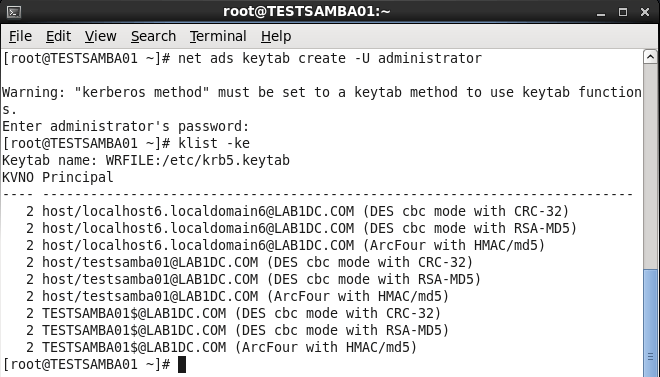
3.   Create keytab file for use with Kerberos

Restart SMB and WINBIND Daemon


[Verification]
1.   Verify successfully to join the AD

2.   Check the secret between client and AD

3.   Test the winbind authentication is working

4.   Verify user account function

Since 2010 Design by Davidwa
©Copyright Davidwa Inc. All rights reserved.