網頁

2011年11月29日 星期二

Remove hidden network card from VM on Hyper-V

Recently, I add a new SATA disk to my PC for locating the hyper-v VM. When I export and import VM to this new disk and boot it, the network card is added to this system again and the static IP cannot be set as the original value. The warning message show up then.

By searching Goolge and finding out some solution, I decide to try it by myself.
At first, open "command prompt" by "Run as administrator" right.
( It is a important step that it will fail if you lose this.!)

Follow the screen command to execute it for opening Device Manager.

Select "Show hidden devices"

You will see the hidden network card on the system now.

Select the first hidden network card next to click "Uninstall" button

Repeat the above activity on the second network card.

After finishing this, it will only keep the present network card on system.

Remind you to reboot the system right now so that the change process will be effective.
Now you can set the original IP and no show any warning message again!

2011年11月19日 星期六

不公平的人生

選舉快到了,每天都有勁爆或焦點的新聞,我想:人生也是如此. 本週職場上的勁爆就是"我們Infra IT主管要調單位!"

雖然主管曾經召開會議召集大家說明原因,但這是真的原因嗎? 我也不知道,畢竟我也不是核心人物,也不是肚子的蛔蟲,但也不想知道,畢竟性格又不喜歡八卦,且對於權或利沒有特別想要追求.況且,知道又如何? 知道得越多,另類想法也會越多,煩惱也會越多,頭髮也會白得更多,這會使帥氣的我老得更快,何必呢?

或許您會覺得這個人沒有個性,對於人生沒有企圖心,沒有理想與抱負,缺乏奮鬥與進取心等等負面的觀點,在這個人心險惡的職場上,早晚會被取代掉! 對於這樣的觀感,我只能說: 哈 哈 哈!!!

自從 8~ 9年前剛出生的小孩被診斷出肚子有異物,經過半年的醫生追蹤到後來順利開刀確定是惡性腫瘤,這一路的過程讓我心智確實有些轉變. 再加上這一兩年老婆的妹妹因子宮肌瘤被診斷出屬於惡性腫瘤,目前僅能夠靠藥物及化療來控制,這一路看來,讓我對於人生有著另一種想法---人生就是不公平的!

有些人一生下來就在好家庭與好環境;有些人雖然家境不好,但憑藉自身的努力與付出,長大成人後有一番作為;有些人雖然先天很好,擁有好的家世及聰明才智,但後天卻用在不好的途徑下,最終下場悲哀與淒涼;有些人好不容易熬出頭,但自身卻無法安享晚年,這一切切的情境是我們無法掌控的. 但基於如此,既然無法預知自己的未來,難道從此心志就蕭條與頹廢,懵懵懂懂的度過一生嗎?
也不是如此!

人生就是因為有喜怒哀樂,悲歡離合,才會顯得多采多姿! 重點是:您的人生是否有過任何的遺憾!!!
但何時才是人生的終點? 我也不知道! 所以,唯有把握當下,人生才不會有任何的遺憾!


Group member disappear

When I using Microsoft Windows Server 2008 R2 with Hyper-v to build a new DC, it appear a very strange problem. That is "I cannot see the membership of local group after add a new domain user"!
 

Although I find out someone also contact this status by Goolge and the result cannot resolve it by doing SYSPREP command or installing a special hotfix, it can help me to execute the SYSPREP command.
I think the key point that Cloned disk has still the same GUID on VM.

I don't know what is the different behavior between Hyper-V and VMWare workstation on Cloned-Link disk. Because I can do it on VMware product and never need to do SYSPREP for each VM.

2011年11月12日 星期六

Create MPIO between Windows Server 2008 R2 and Openfiler 2.99.1

Recently, the service of exchange server happen interrupted due to data dirty shutdown. In analyze the log record on network and system, we find out the reason is "iSCSI network quality is unstable". That is sometimes up or down.  How to improve this problem? We decide to build MPIO mechanism between iSCSI target and initiator. And until now, it never happen the same problem again.

What is MPIO? It is very attractive for me and let me want to realize its theory and practice. So I decide to emulate it by myself --- Build a lab for leaning it.

In my lab, I use Openfiler 2.99.1 as the iSCSI storage and VM as each machine because I have no memory to purchase the same machine as the company production. The following diagram is my lab environment:
Now I will begin to do all process step by step!


Confirm the network setting on Openfiler 2.99.1 and Windows Server 2008 R2

  • After install Openfiler 2.99.1 and update last patch, I need to confirm whether Openfiler has two network card belong to the Storage Network.


Delegate the network access to Windows Server 2008 R2 on Openfiler 2.99.1

  • After confirm network card, the next step will create LUN Mapping on iSCSI target for iSCSI initiator.
  • Assign host static IP=10.10.106.70 and 10.10.106.71 to individually on network access configuration


  • Click "Volume" -- >  "iSCSI Targets" -- > "Network ACL" -- > select "Allow" in menu -- > click "Update" button.  After finish the above steps,the three IQN can be accessed by this window host.


Realize the disk status on Windows Server 2008 R2

  • In iSCSI initiator role as windows server 2008 R2 platform, click "Start" -- > "Administrative Tools" -- > "Computer Management"


  • In Computer Management Console, click "Disk Management" to realize the present disk information.  You will see that just only one disk on this system now.


Install the MPIO feature on Windows Server 2008 R2

  • The focus come on now! We will begin to prepare MPIO installation and configuration at the moment. Please click "Start" -- > "Administrative Tools" -- > "Server Manager"

  • In Server Manager Console, click"Features" -- > "Add Features"

  • In Add Features Wizard windows, enable "Multpath I/O" check box -- > "Next >"

  • Click "Install"

  • Click "Close" button to finish install this feature next to reboot


  • Add the first path to iSCSI Target


  • The screen show up that Microsoft iSCSI Service will be started if you agree and click "Yes" button.


  • Click "Discovery" tab and "Discover Portal ..." button


  • Key in the first IP of  iSCSI target and click "OK" button


  • You will see the previous setting on Target Portal record. Click "Discover Portal ..." button again

  • Key in the second IP of  iSCSI target and click "OK" button

  • Now you see the two IP of iSCSI target has been added the Target Portals record.


  • Click "Targets" tab and select one IQN that you want to connect with it later. Click "Connect" button


  • Enable check box on "Add this connection to the list of Favorite Targets" and "Enable mult-path" next to click "Advanced" button


  • Select Local adapter: "Microsoft iSCSI Initiator" , Initiator IP: "10.10.106.70" (The first IP of Server), and Target portal IP: "10.10.106.80/3260" (The first IP of Openfiler)


  • This iSCSI disk has already been connected by Server now.


Enable MPIO on iSCSI Service

  • Click "Start" -- > "Administrative Tools" -- > "MPIO"


  • In "MPIO Devices" tab,you will see a default device called  "Vendor 8 Product    16"


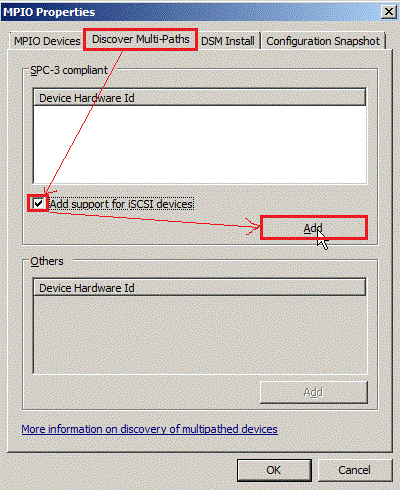
  • Click "Discover Multi-Paths" tab -- > enable "Add support for iSCSI Drives" check box -- > click "Add" button


  • Reboot Windows Server 2008 R2

  • In "MPIO Devices" tab,you will see a new device called  "MSFT2005iSCSIBusType_0x9"


Add the second path to iSCSI Target

  • Open the iSCSI initiator again and click "Target" tab ; select the first IQN and click "Connect" button


  • Enable "Add this connection to the list of Favorite Targets" and "Enable Multi-path" check box ; Click "Advanced..." button


  • Select "Microsoft iSCSI Initiator" on local adapter and the second Server NIC is "10.10.106.71" and the second Storage NIC "10.10.106.81" ; Click "OK" button


View MPIO setting on disk

  • In Computer Management console, you will see a new disk that never is initiated format.


  • Right-Click this and select the properties in menu


  • Select "MPIO" tab, you will see the MPIO policy, DSM name and Path State and so on.


Until now, we have already completed the MPIO creation between Windows Server 2008 R2 and Openfiler 2.99.1. As to whether MPIO function is normal now, I will introduce this to you in the next article.

2011年11月6日 星期日

Cannot configure network settings on TMG 2010

Last week, I want to realize how to push Exchange OWA on TMG 2010 so that I try to install TMG 2010 on Lab.
When I configure network settings on Getting Started Wizard
Select the Back firewall on Network Template Selection
Finally click "Finish" button to complete the Network Setup, I get a Error: 0xc0040304 and message is "There is no such object on the server".
Although I search Google based on these key word and follow these method to do it, the result still cannot be resolved by these articles!


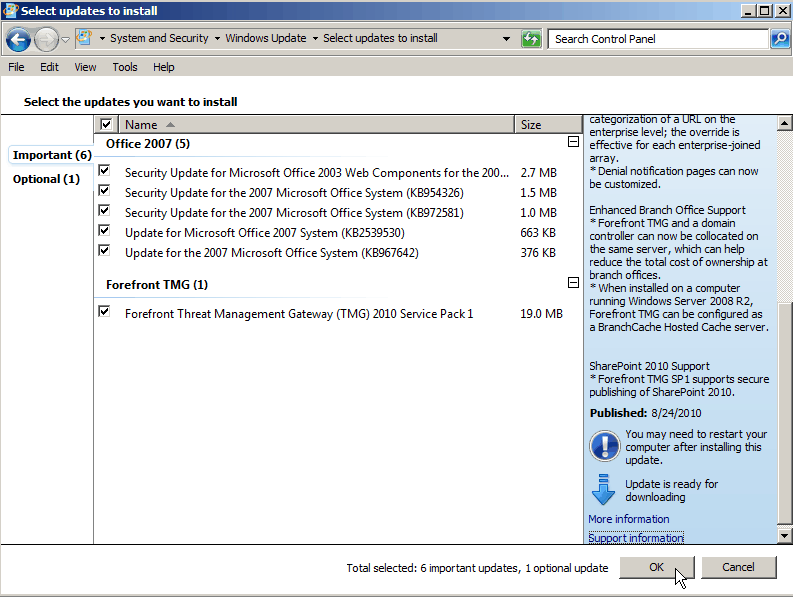
The screen ever show me to install the newest hotfix after installing TMG 2010 software, so I try to run Windows Update again and the result find out some hotfix component as Office 2007, Forefront TMG SP1/SP2, SQL Server 2008 SP3 never is installed. 
Due to I have any idea or solution to resolve this problem now, I decide to try it to install hotfix up to date. After install it and reboot system, I can complete network configuration now.

 I just know the problem is resolved, but the root cause never get it for me. Maybe need to one by one install a hotfix to realize which hotfix resolve it!

Since 2010 Design by Davidwa
©Copyright Davidwa Inc. All rights reserved.